
This guide covers instructions for how to verify consolidation-only returns. For instructions on how to verify returns that require Grading, click here.
During Verification, all items from consolidation-only returns are packaged together in an poly bag and identified with a singular License Plate.
Verify
After logging in to the ReturnBear Admin and looking up the return case on the Verify page, record each item's condition as either Received Damaged, Not Received, or Received Like New.
 |
|
For more information on recording the condition of a return item, including what to do if you have no matching items, see Verify: Overview |
You will record the condition of each return item one after the other until all items have been verified.
Pack
On the Pack page, take the following actions:
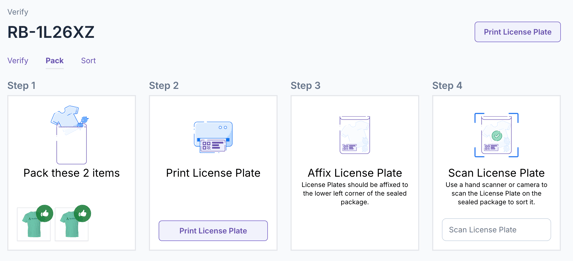
- Step 1: Pack all items together into an poly bag
- Step 2: Click Print License Plate to print out the return case License Plate
- Step 3: Affix the printed License Plate to the lower left corner of the sealed poly bag
- Step 4: Use a hand scanner or the camera to scan the License Plate on the sealed package
Sort
On the Sort page, take the following actions:
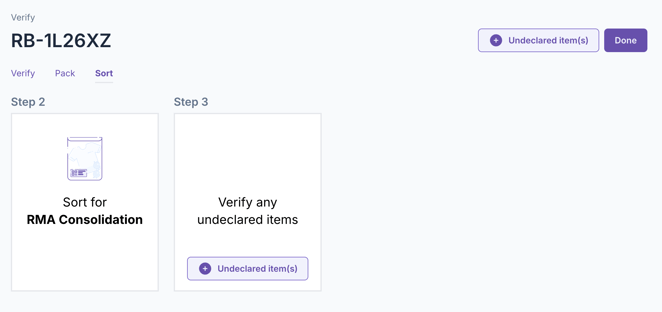
- Step 1: Sort the return according to the displayed instructions
- Sort for RMA Consolidation: The return case and its items are ready to be prepared for fulfillment back to the merchant
- Sort for Quarantine: The return case either failed verification or one or more items are missing the information required to prepare the return for fulfillment back to the merchant
- Step 2: Verify any undeclared items
- If you have received any Undeclared items in addition to or instead of item(s) that are declared in the return case, click + Undeclared item(s) to record them
 |
|
For more information on how to record an Undeclared item, see Verify: Overview |
Once the return case has been sorted and any Undeclared items have been recorded, click Done to complete verification.
The next step for consolidation-only returns is: Warehouse.