
After an inventory item has been sorted for Grading during verification, the item requires additional in-depth inspection per the merchant's service level.
Previous step: Verify for Grading.
Getting Started
Log in to the Hub App using your provided log in credentials.
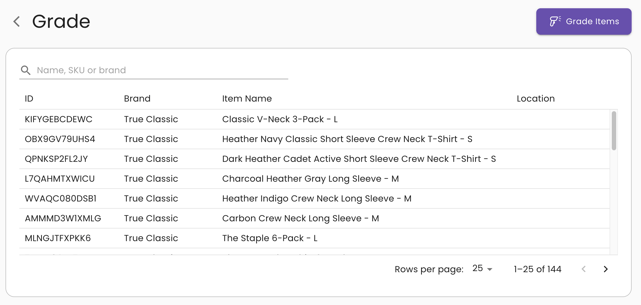
From the Hub App dashboard, click on Grade to view a list of items that require grading:
Grade
To begin grading, click on the Grade Items button:
In the Scan an item modal, either scan an inventory item's License Plate or search for an item using the search bar to locate the item in the system.
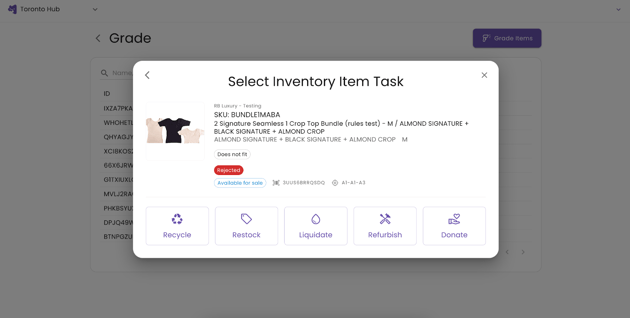
After scanning an inventory item's License Plate or locating it via manual search, the Select Inventory Item Task modal will appear.
Closely inspect the item according to the standard grading criteria as follows:
- Is the item in sellable condition?
- Are the item's packaging, tags, or accessories in sellable condition?
- Can ReturnBear re-pack and/or re-tag the item?
How the grading criteria is checked and how an item is prepared and repacked depends on the item’s product category. For more information, see Service Definitions and Standard Operating Procedures (SOPs).
Grading statuses, definitions, and inventory item tasks
The standard grading criteria determines the status of the item.
Is the item in sellable condition? |
Are the item's packaging, tags, or accessories in sellable condition? |
Can ReturnBear re-pack and/or re-tag the item? |
Status |
| Yes | Yes | N/A | Retail Ready |
| Yes | No | Yes | Repack Required |
| Yes | No | No | Packaging Required |
| No | Yes | N/A | Damaged - Packaging OK |
| No | No | N/A | Damaged |
The status of the item determines the inventory item task.
Status |
Definition |
Inventory Item Task |
| Retail Ready | Quality of the item and packaging matches its state at the time of original order fulfillment. | Restock |
| Repack Required | The packaging, tags, or accessories are not in sellable condition and ReturnBear has the standard materials needed to repack the item to Retail Ready status. | Restock |
| Packaging Required | The packaging, tags, or accessories are not in sellable condition and repackaging will require more than the standard materials ReturnBear has on hand. | Restock |
| Damaged - Packaging OK | The packaging, tags, or accessories are in sellable condition, but the item is not in sellable condition and cannot be repackaged by ReturnBear. | Recycle or Donate |
| Damaged | The item and its packaging, tags, or accessories are not in sellable condition and ReturnBear cannot repackage the item. | Recycle or Donate |
After completing the item's inspection, select the applicable Inventory Item Task:
- Restock: The item is in sellable condition, the item's packaging, tags, or accessories are in sellable condition AND ReturnBear can re-pack and/or re-tag the item to prepare it for sale
- Recycle: The item is not in sellable condition, the item's packaging, tags, or accessories are not in sellable condition AND ReturnBear cannot re-pack and/or re-tag the item to prepare it for sale
- Donate: The item is not in sellable condition, the item's packaging, tags, or accessories are not in sellable condition AND ReturnBear cannot re-pack and/or re-tag the item to prepare it for sale
Whether an item is recycled or donated depends on the merchant's agreement with ReturnBear.
Once the Inventory Item Task has been selected, proceed to the next step: Warehouse.